PowerPort Pro™ — Lift Your Laptop, Power 8 Devices, Fold Flat for Your Bag
Ditch the Dongle Pile — One Foldable Slab Lifts Your Laptop and Powers 8 Devices
For anyone running a MacBook or laptop with two USB-C ports and a drawer full of adapters, PowerPort Pro™ is the slab that ends the mess. One USB-C cable into your laptop. Eight ports out the back. Six locked heights between your screen and your neck. Fits any laptop or tablet from 10" to 17", holds up to 44 lbs, folds flat for your bag.

Stop Crawling Behind Your Desk Every Time You Plug Something In
You went USB-C-only and inherited a new problem: dongle hell. A dongle for HDMI. A dongle for the SD card. A separate USB-A hub for your mouse. A brick for charging. And by 3pm, your neck is sending complaints because the screen is too low. The solution isn't another adapter. It's one slab that does the lift, the ports, and the 100W charge — and folds flat when you walk out the door.
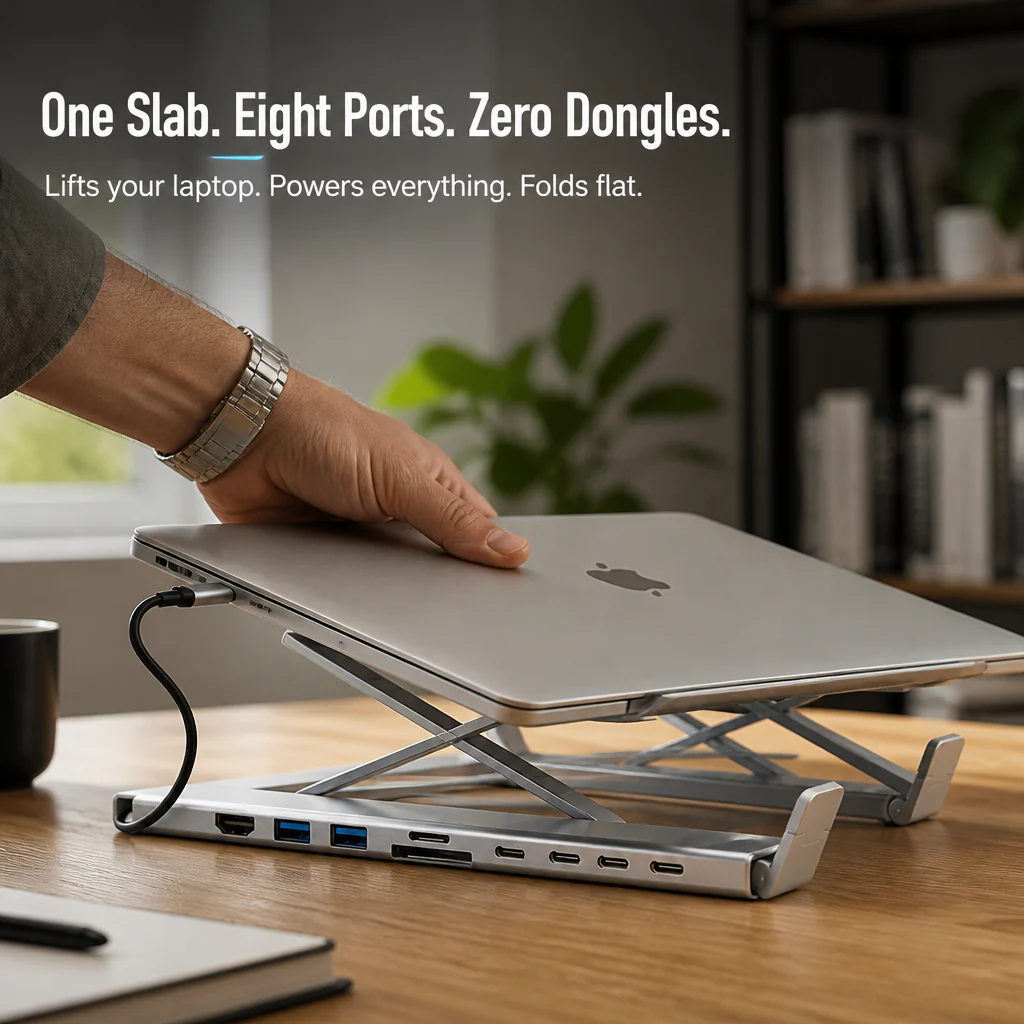
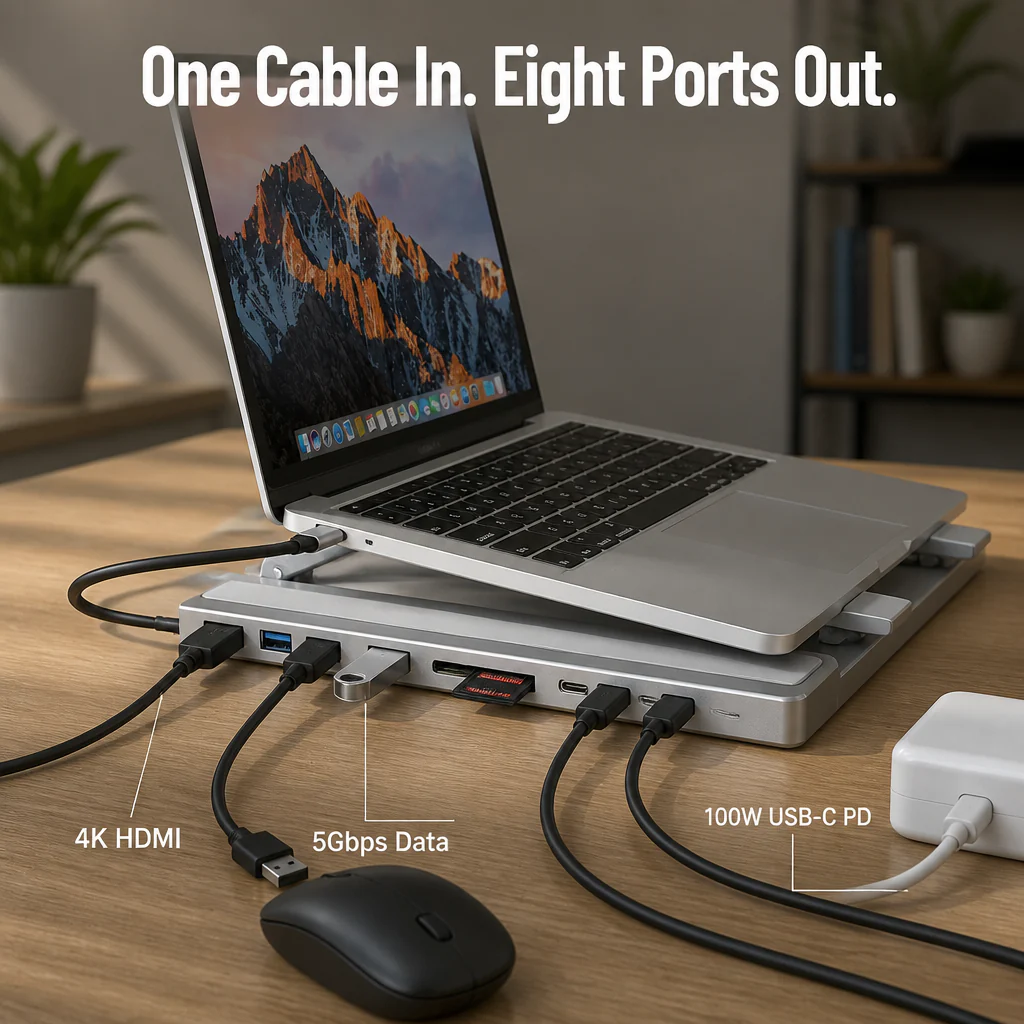
➤ Plug 8 Devices Into One Slab, No Dongle Drawer: 4K HDMI, two USB-A 3.0, USB-C data, SD, TF, and 100W USB-C PD — every port built into the slab your laptop is already sitting on.
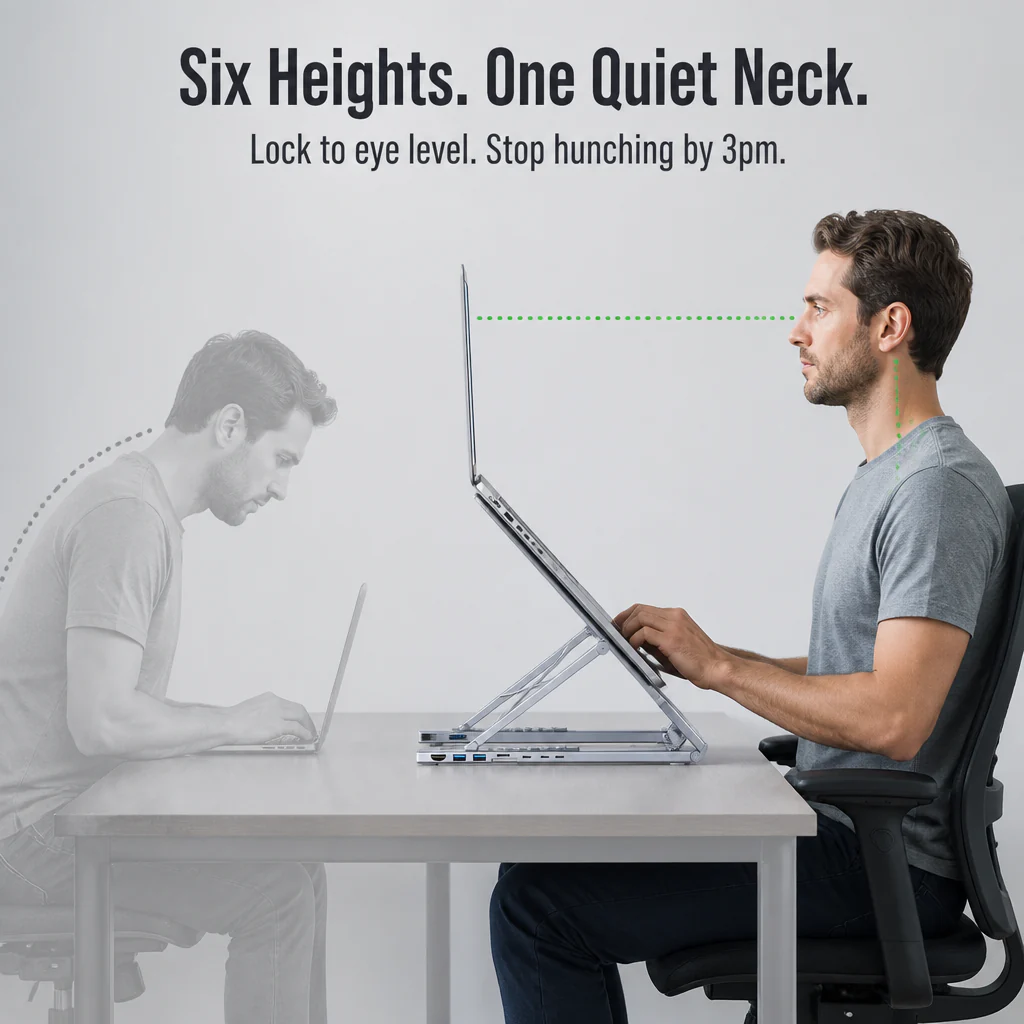
➤ Lock Your Screen to Eye Level in Six Clicks: Aluminum hinges click into six height positions. Match your chair, kill the hunch, save the neck for the gym.
➤ Fold It Flat, Drop It in Your Bag: Collapses to roughly the size of a paperback. Carry pouch and USB-C cable included. Coffee-shop-ready in under 10 seconds.

Meet PowerPort Pro™ — One Aluminum Slab That Replaces Three Pieces of Gear
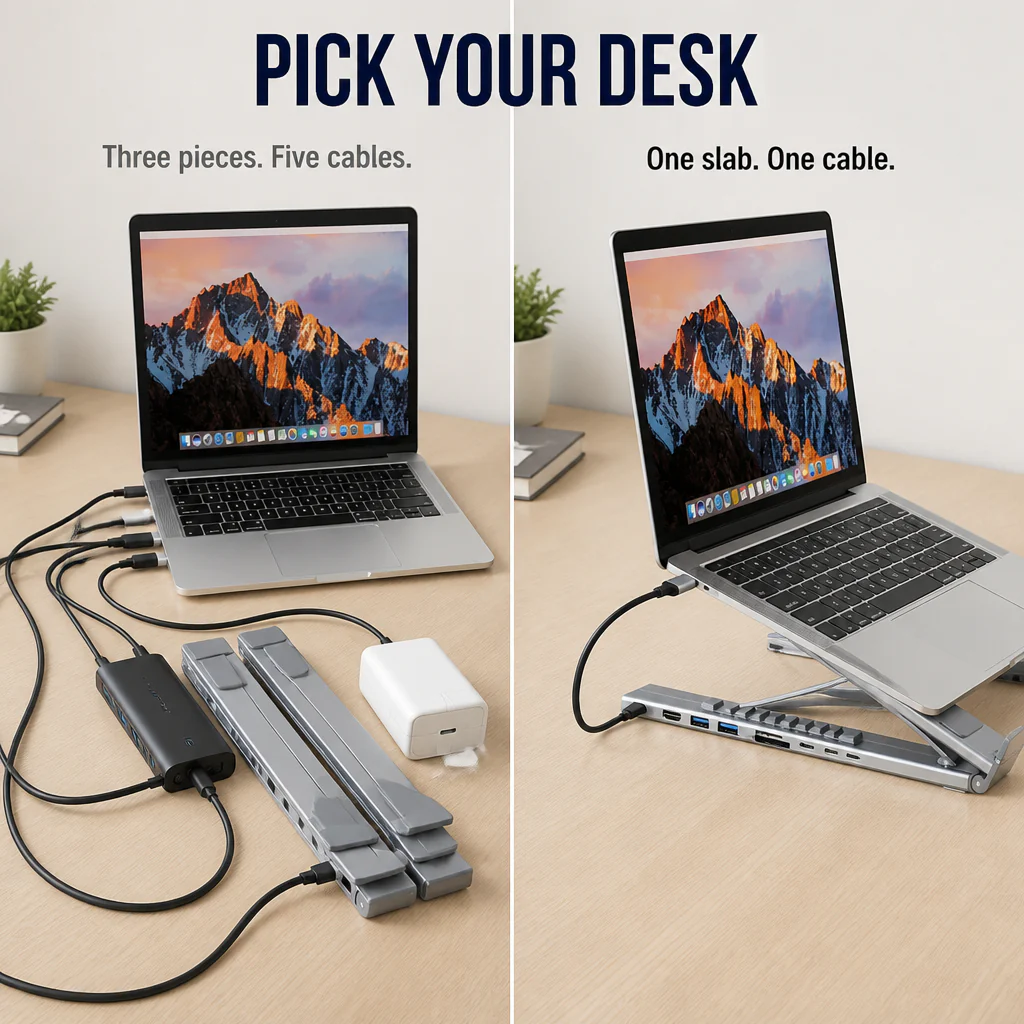
It's a laptop stand. It's an 8-port dock. It's a 100W charging passthrough. Wrapped into a single piece of folded aluminum that lives between your laptop and your desk. One USB-C cable connects everything to your machine. Pull that cable, fold the slab, and it goes with you.
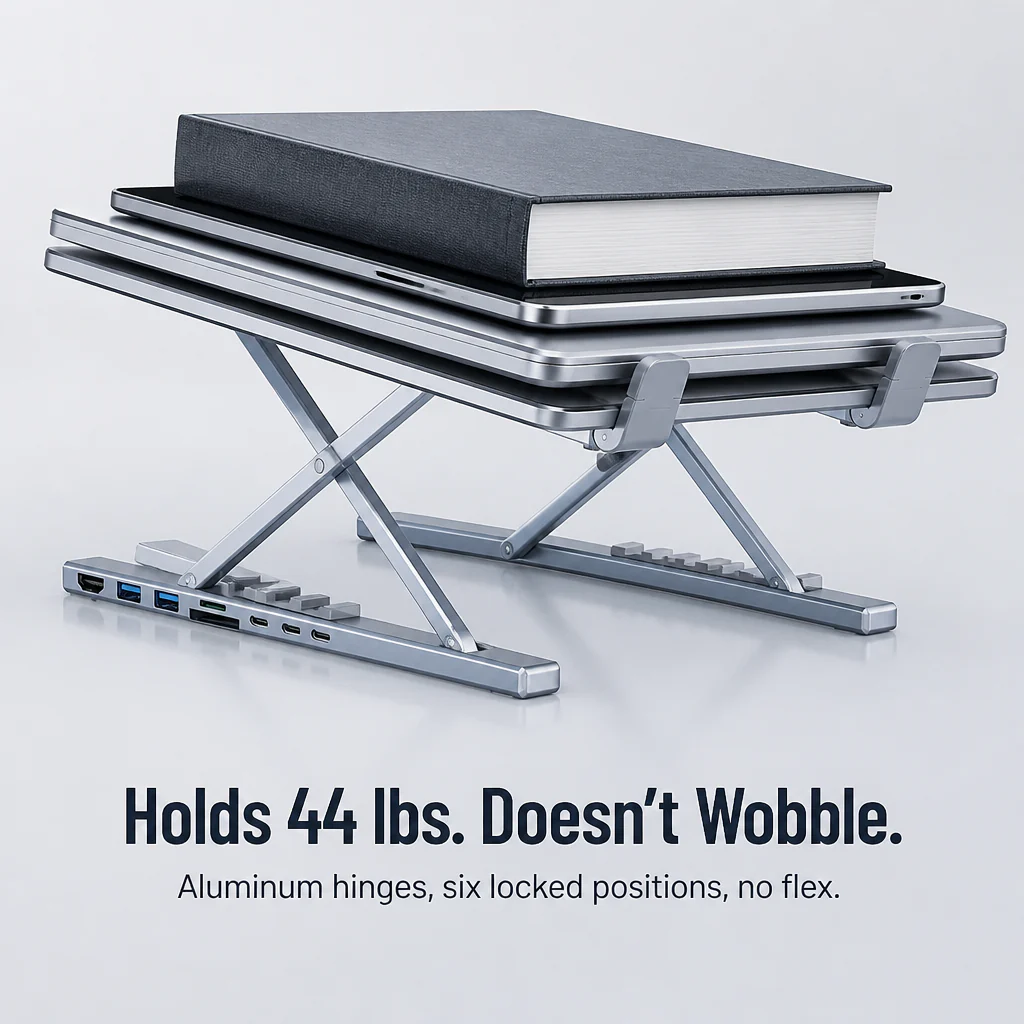
The aluminum chassis is the structural piece — it holds 44 lbs of laptop and lifts to six locked positions without wobble. The ports run along the back edge: HDMI 4K@30Hz, two USB-A 3.0 (5Gbps each), a USB-C data port (5Gbps), SD and TF card slots, and a USB-C PD input rated for 100W fast charging on a 16" MacBook Pro, iPad, Switch, or phone.

Why WFH Engineers and Creators Are Trading Their Dongle Drawer for PowerPort Pro™
The pattern in the reviews is the same: people start with a hub, a separate stand, and a 100W brick. Then they get tired of the wires running in three directions and the screen still being too low. One slab, one cable in, eight ports out — and the neck thing finally goes quiet.
"I was running a hub, a stand, and a brick. Now my desk is a slab and a cable. The 100W on a 16" MacBook is the real deal — no dimming, no fan freak-out." — Marcus K.
"Three weeks in and my neck stopped doing that 3pm thing. Didn't expect that from a USB-C hub." — Priya S.

One Cable In. Eight Ports Out. Your Neck Stops Complaining.
✓ One USB-C In, Eight Ports Out: Single cable from the slab to your laptop. The spaghetti behind your screen goes away. Mouse, keyboard, monitor, drive, SD card, charger — all routed through the slab.
✓ Six Locked Heights That Match Your Chair: Click to the angle that keeps your neck quiet from the first email to the last call. No leaning, no books-under-the-laptop, no Amazon-bin riser.
✓ Real 100W Power + 5Gbps Data, Together: Fast-charge a 16" MacBook Pro while you dump 4K video onto an SSD. No picking which one matters more.
Set It Up in Three Moves, Then Forget It's There
Step 1: Unfold the aluminum stand, click it to one of six heights, set your laptop on top.
Step 2: Run the included USB-C cable from the slab into your laptop. That's the whole connection.
Step 3: Plug your monitor, mouse, drive, charger, and SD card into the back of the slab. Walk away. Your setup is done for the day.

| PowerPort Pro™ | Separate Dongles & Hub | Plain Laptop Stand |
|---|---|---|
| ✅ 8 ports + stand in one aluminum slab | ❌ 3–5 separate adapters tangled behind the screen | ❌ Lifts the laptop. Does nothing else. |
| ✅ Six locked height positions, holds 44 lbs | ❌ Laptop stays flat — neck pays the price | ✅ Adjustable, but no ports at all |
| ✅ 100W charging + 5Gbps data on the same cable | ❌ Cheap hubs cap at 60W or drop data speed | ❌ No power, no data — just metal |
Full Specs For the Detail-Obsessed
- Type: 8-in-1 USB-C Docking Laptop Stand
- Ports: HDMI 4K@30Hz, 2× USB-A 3.0 (5Gbps), 1× USB-C data (5Gbps), 1× USB-C PD input (100W), 1× SD card, 1× TF/microSD card, 1× USB-C host to laptop
- Material: Aluminum alloy
- Color: Silver
- Laptop/Tablet size: Fits 10" to 17"
- Max load: 44 lbs (20 kg)
- Height settings: 6 locked positions, foldable flat
- Includes: 1× PowerPort Pro™ Stand Hub, 1× USB-C cable, 1× carry pouch
The Questions You're About to Type Into Google Anyway
Will it work with my MacBook? My Windows laptop? My iPad?
Yes to all three, as long as the device has a USB-C port that supports display output and power delivery. Works with M-series MacBooks, USB-C Windows laptops (XPS, ThinkPad, Surface), iPad Pro/Air with USB-C, and most modern Android tablets.
Does it actually fast-charge a 16" MacBook Pro?
Yes — plug a 100W USB-C charger into the PD input and you get full-speed charging on a 16" MacBook Pro, plus data and display on the other ports at the same time. No dimming, no throttling.
Is the stand stable when I'm typing on the laptop directly?
The aluminum hinges lock at each height position — no flex, no wobble under normal typing. Rated for 44 lbs, so a 16" MacBook Pro or a Surface plus a tablet on top is well within spec.
Won't my laptop overheat sitting on it?
The opposite — the open frame lifts the laptop off the desk and lets air circulate underneath. Most users see lower fan noise compared to flat-on-desk use.
Does it really fold small enough to travel with?
Yes — folds flat into roughly a paperback footprint and ships with a carry pouch. Slips into a laptop bag next to your machine. Pull it out at a cafe, set up in under 10 seconds.

Try It on Your Desk for 30 Days — Or Send It Back
If PowerPort Pro™ doesn't end your dongle drawer and quiet the 3pm neck thing within 30 days, send it back for a full refund — no restocking, no questions. The slab has to earn its place on your desk. If it doesn't, you don't pay for it.
Original: $54.99
-70%$54.99
$16.50More Images


PowerPort Pro™ — Lift Your Laptop, Power 8 Devices, Fold Flat for Your Bag
Ditch the Dongle Pile — One Foldable Slab Lifts Your Laptop and Powers 8 Devices
For anyone running a MacBook or laptop with two USB-C ports and a drawer full of adapters, PowerPort Pro™ is the slab that ends the mess. One USB-C cable into your laptop. Eight ports out the back. Six locked heights between your screen and your neck. Fits any laptop or tablet from 10" to 17", holds up to 44 lbs, folds flat for your bag.
Stop Crawling Behind Your Desk Every Time You Plug Something In
You went USB-C-only and inherited a new problem: dongle hell. A dongle for HDMI. A dongle for the SD card. A separate USB-A hub for your mouse. A brick for charging. And by 3pm, your neck is sending complaints because the screen is too low. The solution isn't another adapter. It's one slab that does the lift, the ports, and the 100W charge — and folds flat when you walk out the door.
➤ Plug 8 Devices Into One Slab, No Dongle Drawer: 4K HDMI, two USB-A 3.0, USB-C data, SD, TF, and 100W USB-C PD — every port built into the slab your laptop is already sitting on.
➤ Lock Your Screen to Eye Level in Six Clicks: Aluminum hinges click into six height positions. Match your chair, kill the hunch, save the neck for the gym.
➤ Fold It Flat, Drop It in Your Bag: Collapses to roughly the size of a paperback. Carry pouch and USB-C cable included. Coffee-shop-ready in under 10 seconds.
Meet PowerPort Pro™ — One Aluminum Slab That Replaces Three Pieces of Gear
It's a laptop stand. It's an 8-port dock. It's a 100W charging passthrough. Wrapped into a single piece of folded aluminum that lives between your laptop and your desk. One USB-C cable connects everything to your machine. Pull that cable, fold the slab, and it goes with you.
The aluminum chassis is the structural piece — it holds 44 lbs of laptop and lifts to six locked positions without wobble. The ports run along the back edge: HDMI 4K@30Hz, two USB-A 3.0 (5Gbps each), a USB-C data port (5Gbps), SD and TF card slots, and a USB-C PD input rated for 100W fast charging on a 16" MacBook Pro, iPad, Switch, or phone.
Why WFH Engineers and Creators Are Trading Their Dongle Drawer for PowerPort Pro™
The pattern in the reviews is the same: people start with a hub, a separate stand, and a 100W brick. Then they get tired of the wires running in three directions and the screen still being too low. One slab, one cable in, eight ports out — and the neck thing finally goes quiet.
"I was running a hub, a stand, and a brick. Now my desk is a slab and a cable. The 100W on a 16" MacBook is the real deal — no dimming, no fan freak-out." — Marcus K.
"Three weeks in and my neck stopped doing that 3pm thing. Didn't expect that from a USB-C hub." — Priya S.
One Cable In. Eight Ports Out. Your Neck Stops Complaining.
✓ One USB-C In, Eight Ports Out: Single cable from the slab to your laptop. The spaghetti behind your screen goes away. Mouse, keyboard, monitor, drive, SD card, charger — all routed through the slab.
✓ Six Locked Heights That Match Your Chair: Click to the angle that keeps your neck quiet from the first email to the last call. No leaning, no books-under-the-laptop, no Amazon-bin riser.
✓ Real 100W Power + 5Gbps Data, Together: Fast-charge a 16" MacBook Pro while you dump 4K video onto an SSD. No picking which one matters more.
Set It Up in Three Moves, Then Forget It's There
Step 1: Unfold the aluminum stand, click it to one of six heights, set your laptop on top.
Step 2: Run the included USB-C cable from the slab into your laptop. That's the whole connection.
Step 3: Plug your monitor, mouse, drive, charger, and SD card into the back of the slab. Walk away. Your setup is done for the day.
| PowerPort Pro™ | Separate Dongles & Hub | Plain Laptop Stand |
|---|---|---|
| ✅ 8 ports + stand in one aluminum slab | ❌ 3–5 separate adapters tangled behind the screen | ❌ Lifts the laptop. Does nothing else. |
| ✅ Six locked height positions, holds 44 lbs | ❌ Laptop stays flat — neck pays the price | ✅ Adjustable, but no ports at all |
| ✅ 100W charging + 5Gbps data on the same cable | ❌ Cheap hubs cap at 60W or drop data speed | ❌ No power, no data — just metal |
Full Specs For the Detail-Obsessed
- Type: 8-in-1 USB-C Docking Laptop Stand
- Ports: HDMI 4K@30Hz, 2× USB-A 3.0 (5Gbps), 1× USB-C data (5Gbps), 1× USB-C PD input (100W), 1× SD card, 1× TF/microSD card, 1× USB-C host to laptop
- Material: Aluminum alloy
- Color: Silver
- Laptop/Tablet size: Fits 10" to 17"
- Max load: 44 lbs (20 kg)
- Height settings: 6 locked positions, foldable flat
- Includes: 1× PowerPort Pro™ Stand Hub, 1× USB-C cable, 1× carry pouch
The Questions You're About to Type Into Google Anyway
Will it work with my MacBook? My Windows laptop? My iPad?
Yes to all three, as long as the device has a USB-C port that supports display output and power delivery. Works with M-series MacBooks, USB-C Windows laptops (XPS, ThinkPad, Surface), iPad Pro/Air with USB-C, and most modern Android tablets.
Does it actually fast-charge a 16" MacBook Pro?
Yes — plug a 100W USB-C charger into the PD input and you get full-speed charging on a 16" MacBook Pro, plus data and display on the other ports at the same time. No dimming, no throttling.
Is the stand stable when I'm typing on the laptop directly?
The aluminum hinges lock at each height position — no flex, no wobble under normal typing. Rated for 44 lbs, so a 16" MacBook Pro or a Surface plus a tablet on top is well within spec.
Won't my laptop overheat sitting on it?
The opposite — the open frame lifts the laptop off the desk and lets air circulate underneath. Most users see lower fan noise compared to flat-on-desk use.
Does it really fold small enough to travel with?
Yes — folds flat into roughly a paperback footprint and ships with a carry pouch. Slips into a laptop bag next to your machine. Pull it out at a cafe, set up in under 10 seconds.
Try It on Your Desk for 30 Days — Or Send It Back
If PowerPort Pro™ doesn't end your dongle drawer and quiet the 3pm neck thing within 30 days, send it back for a full refund — no restocking, no questions. The slab has to earn its place on your desk. If it doesn't, you don't pay for it.
Product Information
Product Information
Shipping & Returns
Shipping & Returns
Description
Ditch the Dongle Pile — One Foldable Slab Lifts Your Laptop and Powers 8 Devices
For anyone running a MacBook or laptop with two USB-C ports and a drawer full of adapters, PowerPort Pro™ is the slab that ends the mess. One USB-C cable into your laptop. Eight ports out the back. Six locked heights between your screen and your neck. Fits any laptop or tablet from 10" to 17", holds up to 44 lbs, folds flat for your bag.
Stop Crawling Behind Your Desk Every Time You Plug Something In
You went USB-C-only and inherited a new problem: dongle hell. A dongle for HDMI. A dongle for the SD card. A separate USB-A hub for your mouse. A brick for charging. And by 3pm, your neck is sending complaints because the screen is too low. The solution isn't another adapter. It's one slab that does the lift, the ports, and the 100W charge — and folds flat when you walk out the door.
➤ Plug 8 Devices Into One Slab, No Dongle Drawer: 4K HDMI, two USB-A 3.0, USB-C data, SD, TF, and 100W USB-C PD — every port built into the slab your laptop is already sitting on.
➤ Lock Your Screen to Eye Level in Six Clicks: Aluminum hinges click into six height positions. Match your chair, kill the hunch, save the neck for the gym.
➤ Fold It Flat, Drop It in Your Bag: Collapses to roughly the size of a paperback. Carry pouch and USB-C cable included. Coffee-shop-ready in under 10 seconds.
Meet PowerPort Pro™ — One Aluminum Slab That Replaces Three Pieces of Gear
It's a laptop stand. It's an 8-port dock. It's a 100W charging passthrough. Wrapped into a single piece of folded aluminum that lives between your laptop and your desk. One USB-C cable connects everything to your machine. Pull that cable, fold the slab, and it goes with you.
The aluminum chassis is the structural piece — it holds 44 lbs of laptop and lifts to six locked positions without wobble. The ports run along the back edge: HDMI 4K@30Hz, two USB-A 3.0 (5Gbps each), a USB-C data port (5Gbps), SD and TF card slots, and a USB-C PD input rated for 100W fast charging on a 16" MacBook Pro, iPad, Switch, or phone.
Why WFH Engineers and Creators Are Trading Their Dongle Drawer for PowerPort Pro™
The pattern in the reviews is the same: people start with a hub, a separate stand, and a 100W brick. Then they get tired of the wires running in three directions and the screen still being too low. One slab, one cable in, eight ports out — and the neck thing finally goes quiet.
"I was running a hub, a stand, and a brick. Now my desk is a slab and a cable. The 100W on a 16" MacBook is the real deal — no dimming, no fan freak-out." — Marcus K.
"Three weeks in and my neck stopped doing that 3pm thing. Didn't expect that from a USB-C hub." — Priya S.
One Cable In. Eight Ports Out. Your Neck Stops Complaining.
✓ One USB-C In, Eight Ports Out: Single cable from the slab to your laptop. The spaghetti behind your screen goes away. Mouse, keyboard, monitor, drive, SD card, charger — all routed through the slab.
✓ Six Locked Heights That Match Your Chair: Click to the angle that keeps your neck quiet from the first email to the last call. No leaning, no books-under-the-laptop, no Amazon-bin riser.
✓ Real 100W Power + 5Gbps Data, Together: Fast-charge a 16" MacBook Pro while you dump 4K video onto an SSD. No picking which one matters more.
Set It Up in Three Moves, Then Forget It's There
Step 1: Unfold the aluminum stand, click it to one of six heights, set your laptop on top.
Step 2: Run the included USB-C cable from the slab into your laptop. That's the whole connection.
Step 3: Plug your monitor, mouse, drive, charger, and SD card into the back of the slab. Walk away. Your setup is done for the day.
| PowerPort Pro™ | Separate Dongles & Hub | Plain Laptop Stand |
|---|---|---|
| ✅ 8 ports + stand in one aluminum slab | ❌ 3–5 separate adapters tangled behind the screen | ❌ Lifts the laptop. Does nothing else. |
| ✅ Six locked height positions, holds 44 lbs | ❌ Laptop stays flat — neck pays the price | ✅ Adjustable, but no ports at all |
| ✅ 100W charging + 5Gbps data on the same cable | ❌ Cheap hubs cap at 60W or drop data speed | ❌ No power, no data — just metal |
Full Specs For the Detail-Obsessed
- Type: 8-in-1 USB-C Docking Laptop Stand
- Ports: HDMI 4K@30Hz, 2× USB-A 3.0 (5Gbps), 1× USB-C data (5Gbps), 1× USB-C PD input (100W), 1× SD card, 1× TF/microSD card, 1× USB-C host to laptop
- Material: Aluminum alloy
- Color: Silver
- Laptop/Tablet size: Fits 10" to 17"
- Max load: 44 lbs (20 kg)
- Height settings: 6 locked positions, foldable flat
- Includes: 1× PowerPort Pro™ Stand Hub, 1× USB-C cable, 1× carry pouch
The Questions You're About to Type Into Google Anyway
Will it work with my MacBook? My Windows laptop? My iPad?
Yes to all three, as long as the device has a USB-C port that supports display output and power delivery. Works with M-series MacBooks, USB-C Windows laptops (XPS, ThinkPad, Surface), iPad Pro/Air with USB-C, and most modern Android tablets.
Does it actually fast-charge a 16" MacBook Pro?
Yes — plug a 100W USB-C charger into the PD input and you get full-speed charging on a 16" MacBook Pro, plus data and display on the other ports at the same time. No dimming, no throttling.
Is the stand stable when I'm typing on the laptop directly?
The aluminum hinges lock at each height position — no flex, no wobble under normal typing. Rated for 44 lbs, so a 16" MacBook Pro or a Surface plus a tablet on top is well within spec.
Won't my laptop overheat sitting on it?
The opposite — the open frame lifts the laptop off the desk and lets air circulate underneath. Most users see lower fan noise compared to flat-on-desk use.
Does it really fold small enough to travel with?
Yes — folds flat into roughly a paperback footprint and ships with a carry pouch. Slips into a laptop bag next to your machine. Pull it out at a cafe, set up in under 10 seconds.
Try It on Your Desk for 30 Days — Or Send It Back
If PowerPort Pro™ doesn't end your dongle drawer and quiet the 3pm neck thing within 30 days, send it back for a full refund — no restocking, no questions. The slab has to earn its place on your desk. If it doesn't, you don't pay for it.